Scontrino Smart
Scontrino Smart is Epson’s solution that enables the transformation of a paper commercial receipt into a digital document, delivering it to the end customer through electronic channels. Thanks to Scontrino Smart, retailers can offer a more modern and sustainable shopping experience by reducing paper consumption and simplifying the storage and retrieval of purchase documents. Customers can receive and keep their documents in digital format, making them available whenever needed.
Requirements
To activate the Scontrino Smart service, the following are required:
An Epson Native RT Fiscal Printer (serial numbers 99IEB or 99IEC);
RT firmware version 9.00 - BN 356 or later;
An active annual Scontrino Smart license.
The Scontrino Smart feature is also available on the FP-81II 58 mm fiscal printer, provided that the DGFE board is upgraded to the 8 GB e-receipt version (part number 7113086).
Service Activation
Activating Scontrino Smart is simple and immediate: simply access the dedicated portal and enter the activation code received at the time of purchase. The license is associated with the Fiscal Printer and remains active for 12 months.
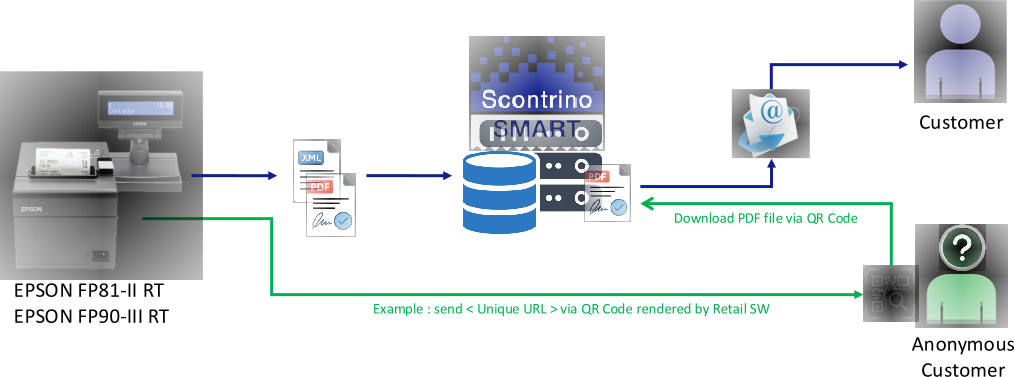
How Scontrino Smart Works
Activating the license enables the Fiscal Printer to issue commercial documents in Print Only, Digital Only or Print + Digital modes. The issuing mode can be configured globally or defined individually for each transaction.
To send a digital commercial document, the POS software or the Fiscal Printer keyboard must transmit the end customer's email address. The Fiscal Printer generates a digitally signed PDF document in PAdES format and delivers it according to the configured method.
For customers enrolled in the Epson Loyalty Card program, it is sufficient to acquire the unique identifier associated with the card, including by scanning the relevant barcode.
For customers who prefer not to provide their email address, the POS software can retrieve the URL of the PDF document stored in the Epson cloud and make it available through the most appropriate channel for the operational context, for example by generating and printing a QR Code, allowing the customer to independently view or download the document.
Note: In anonymous mode, PDF documents are stored in the Epson cloud for a maximum period of 30 days. In all other delivery modes, the document is automatically deleted once delivery to the end customer has been completed.
Integration with POS Software
For partners and developers, the Communication Protocol Guide is available. It describes the E-Receipt functionality and the integration methods with Epson Fiscal Printers.
Advanced Solutions
For specific projects, additional features and dedicated integrations with third-party systems, CRM platforms, and partner software solutions are available.
For further information about the available solutions and integration opportunities, please contact your Epson sales representative.